
 One of the biggest hassles when 3d Printing is the process of checking regularly that the printer is all nicely lined up and that nothing has moved, that will mess up your next print, and the biggest cause of problems is getting the print bed exactly lined up with the print head. Get it slightly out and your ability to print fine detail and small layers is impaired, a long way out and you may not even be able to get the first layer to stick.
the most commonly used approach to levelling the print bed is to place an object on the bed and slowly lowering and raising the print head, use the object to feel when the head just touches it. Take a reading of what hight the print head is at and then repeat somewhere else on the print bed. Once you have a few measurements you can start to tweak the length of the support struts until all of the measurements even out.
Z-Probe and beyond…
One enhancement that not many people know about on the RepRapPro Huxley is the z-probe feature. This feature requires some additional work to set up (soldering on the heated bed, extra electronics wired up to the Melzi or Sanguinalolu controller and a bit of extra code in the firmware).
 the z-probe is a circuit constructed around the three support struts, the probe is triggered when the print head pushes down on the bed. It is a horribly fickle interface and sometimes fails, but when it is working it makes the whole process of aligning the bed so much quicker and easier.
But despite the z-probe feature making life easier, it is still frustrating having to fiddle around with spanners every time you make a small change.
I am sure the idea of dynamically adjusting the z axes to account for any small slope in the print surface has been considered in the past. In fact I have even seen one article about how you might modify the G-Code in advance to include such a compensation.
My solution is to put the adjustments directly into the printers firmware, making the compensation the last action before the head is moved to a new location.
This has a number of advantages:
- The user does not need to have any understanding of how the levelling process is performed. A calibrate command at the start of printing, or when the device is turned on, (or maybe even when the user selects a calibrate button because he has just changed the bed configuration) measures the bed and determines its orientation and stores this information for later.
- The slicing tool does not need specific knowledge of the current state of the printer, so a file can be sliced ahead of time without having to worry about it crashing into the bed if you have to make a last minute adjustment to the printer. I believe the slicing software should know about the capabilities of the printer, but any printer specific quirks should be accounted for in the printer itself. A file for a laser printer describes how to print the document, it does not contain precise alignment information about the position or orientation of the laser.
- The printer firmware does not need extensive modification, all of the operations are based on an ideal printer right up until the last moment when these idealised coordinates are projected onto the real world.
There are only two places in Marlin, the firmware I chose to work with, where the head is actually moved to a new location, so the impact on the existing code is minimal.
the biggest problem with this plan, which was glaringly obvious at the start of this project, was that the poor little 8bit ATMEL 644p was woefully underpowered to perform the floating point calculations. The solution was to add a floating point unit, and the MicroMEGA uM-FPU appeared to fit the bill quite nicely.
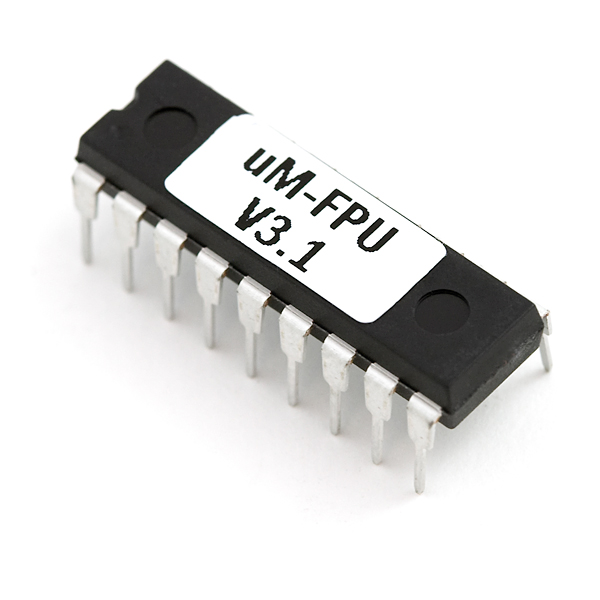 The uM-FPU is a clever little floating point unit that communicates with a CPU via SPI or I2C, and to get around this somewhat slow and clunky interface it can be pre-programmed with functions that can be remotely called by the CPU meaning that only the input values and results need to be passed over the serial bus.
so this project was a success?
Ok, so this works really well right up until the point until you turn the hot-end and heated bed on, then it collapses in a rather messy heap. I am fairly certain that this is related to the interrupt system used to manage the temperature monitor, but I think it would be better, at this point, to turn my attention to a more powerful processor than to continue down this line.
That said, I am very pleased with the results. The head behaves as expected, as if it were aligned with the bed.
My proof of concept code can be found on github, and I invite anyone who thinks that they can find a way around the current issues to give it a go and let me know how you get on.


This is very impressive and I get the impression – one of those Twitter things – that you may well have got around the interrupt problem with the heaters by now. I am learning a lot about micro controller world at the moment but rather worried about making changes to the set up I have based on my new-found knowledge which may be rather imperfect at the moment! Is there / can you create a step by step guide on how to implement both the floating point unit and Z-probe software & hardware? Am I right in thinking that to modify the circuit for the Z probe, it is necessary to scrape away the PCB resist under each levelling screw head and then connect the currently unused wire in the heated bed ribbon cable to one of the expansion pins of the circuit board, (which one?) and that you need a pull up resistor, (to +5v) and decoupling capacitor to ground onto the same pin? If that is about right (phew!), I haven’t a clue how to change the firmware to deal with the calibration routine and report distances as you have done.
Thank you – cracking stuff! What are your thoughts on swapping out the ATMEGA 644P chip with a similar form factor ATMEGA 1284P in order to increase the memory available? Must say, at my age, my eyes and the size of the pins, I wouldn’t fancy taking my soldering iron out!
Alan
Alan,
yes indeed, there is another post due in a couple of days time with an update. It is working, but it has issues that we are working on.
Stephen
Any updates pending/likely in the near future? I’m still very interested in this development.